Data Cleaning with Python and Pandas: A Complete Practical Guide
Learn a repeatable pandas data cleaning workflow: audit, fix text and types, parse dates, handle invalid values, remove duplicates, flag outliers, and validate.

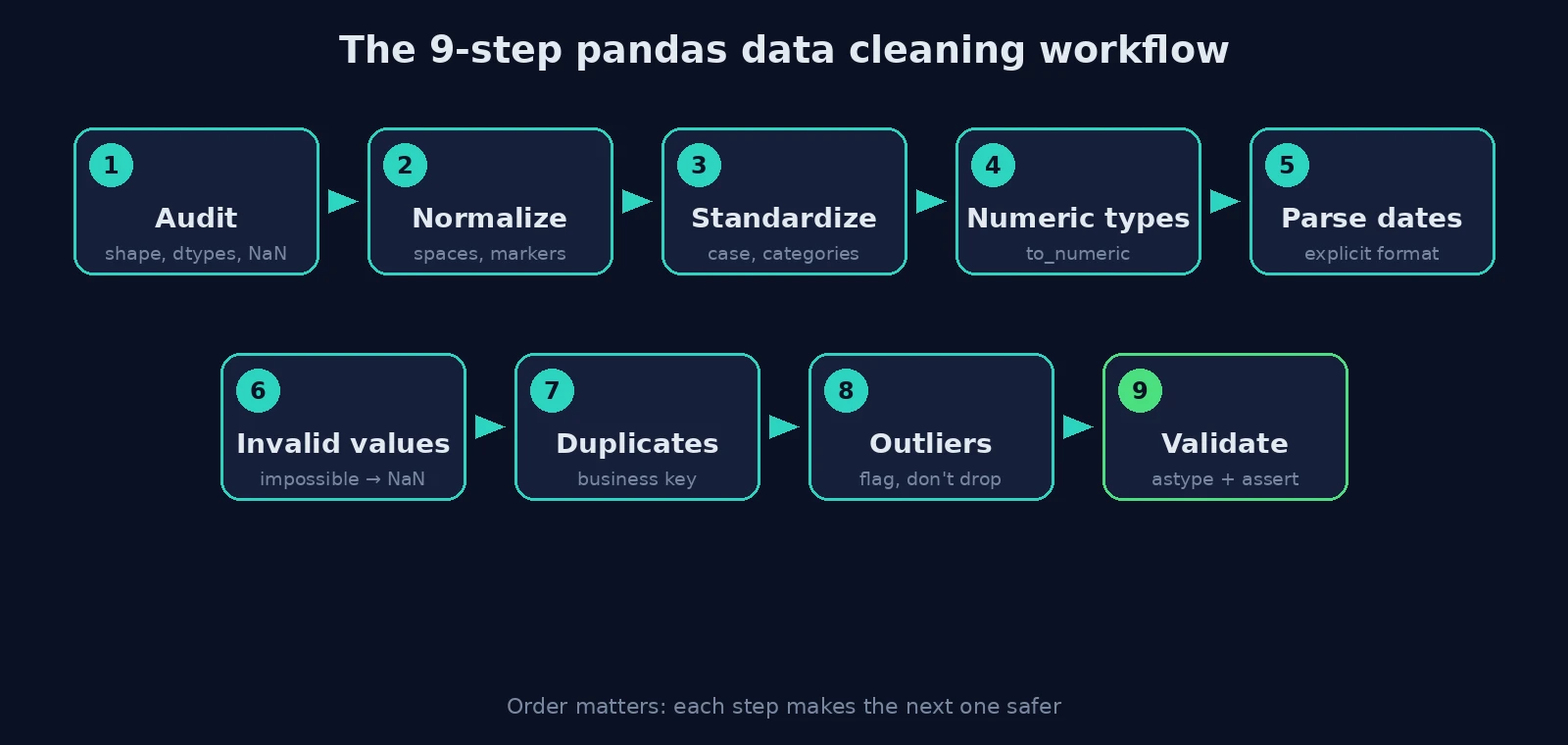
Data cleaning with pandas is not a bag of tricks like dropna() and drop_duplicates(). It is an ordered workflow: audit the data, standardize text and types, convert invalid values into explicit missing values, remove true duplicates, flag outliers, and validate the result. Done in that order, each step makes the next one safer.
This guide walks through that workflow on one deliberately messy dataset, with code you can copy, run, and adapt. By the end you will be able to:
- Audit a raw table before changing anything.
- Fix whitespace, casing, inconsistent categories, currency strings, and mixed date formats.
- Separate missing, invalid, duplicate, and unusual values, which are four different problems.
- Write assertions that prove the cleaned data meets your assumptions.
- Avoid the pandas 3.0 behaviors that break older cleaning tutorials.
If you are new to pandas itself, start with Python for Data Science: A Beginner’s Guide. If your main problem is gaps in the data, the companion article How to Handle Missing Values in Pandas goes deeper than the missing-value step here.
What changed in pandas 3.0 (and why it matters for cleaning)
Many data cleaning tutorials were written for pandas 1.x or 2.x. pandas 3.0, released in January 2026, changed two behaviors that touch cleaning code directly. The official pandas 3.0 release announcement and What’s new in 3.0.0 describe both.
- A dedicated string dtype is now the default. Text columns are inferred as
strinstead of NumPyobject. Thestrdtype can hold only strings (or missing values), and its missing-value sentinel is alwaysNaN. Code that checksdtype == objectto find text columns can silently stop working. - Copy-on-Write is the default and only mode. Every result of an indexing operation behaves as a copy. The practical consequence for cleaning is that chained assignment never updates your original DataFrame:
df[df["x"] > 1]["x"] = 99      # does nothing to df (pandas raises ChainedAssignmentError)
df.loc[df["x"] > 1, "x"] = 99  # correct: one step, on the original
I ran both lines on df = pd.DataFrame({"x": [1, 2, 3]}) with pandas 3.0.2. The first left x as [1, 2, 3] and printed a ChainedAssignmentError warning; the second produced [1, 99, 99]. The Copy-on-Write guide explains the details. If you are still on pandas 2.x, the workflow below still applies, but expect object dtypes where this article shows str.
Install what you need with pip install "pandas>=3" pyarrow. All code below was run on Python with pandas 3.0.2 and NumPy 2.4.4.
The data cleaning workflow at a glance
| Step | Question it answers | Typical tools |
|---|---|---|
| 1. Audit | What is actually in this table? | shape, dtypes, isna().sum(), value_counts() |
| 2. Normalize text and missing markers | Are blanks and spaces hiding as real values? | str.strip(), replace() |
| 3. Standardize categories | Is one thing spelled five ways? | str.lower(), map(), str.title() |
| 4. Convert numeric types | Are numbers stored as text? | str.replace(), to_numeric() |
| 5. Parse dates | Are all dates real dates, in one format? | to_datetime(format=...) |
| 6. Handle invalid values | Which values are impossible, not just missing? | boolean masks, .loc |
| 7. Remove duplicates | Which rows describe the same event? | duplicated(subset=...) |
| 8. Flag outliers | Which values are unusual enough to inspect? | IQR rule |
| 9. Set types and validate | Does the result obey my rules? | astype(), assert |
The messy dataset
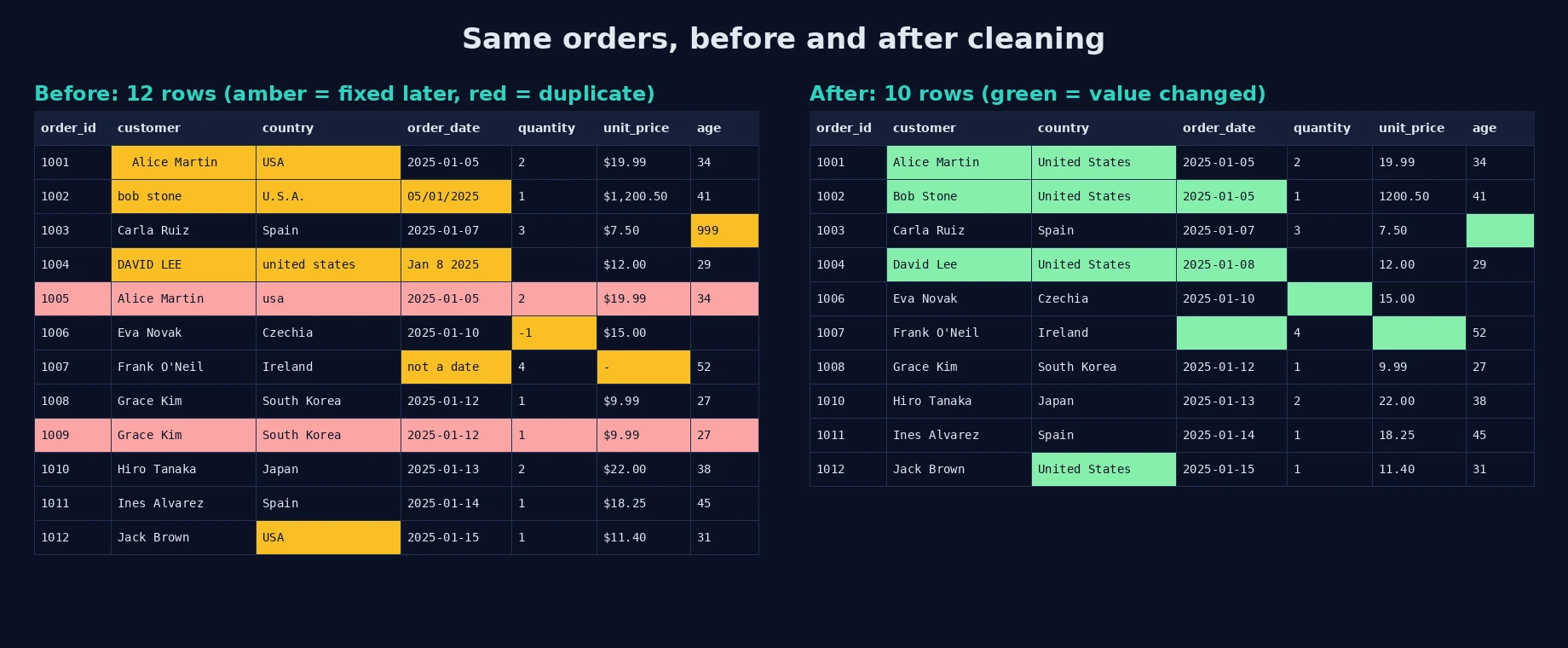
Real files are messy in repeating ways, so the dataset below packs the common problems into 12 order records: stray spaces, inconsistent casing, three spellings of one country, currency symbols, an impossible age, a negative quantity, mixed date formats, an invalid email, and two duplicate orders. It is synthetic, which makes every result reproducible.
import io
import numpy as np
import pandas as pd

raw_csv = """order_id,customer,email,country,order_date,quantity,unit_price,age
1001,  Alice Martin ,alice@example.com,USA,2025-01-05,2,$19.99,34
1002,bob stone,BOB@EXAMPLE.COM,U.S.A.,05/01/2025,1,"$1,200.50",41
1003,Carla Ruiz,carla@example,Spain,2025-01-07,3,$7.50,999
1004,DAVID LEE,david@example.com,united states,Jan 8 2025,N/A,$12.00,29
1005,Alice Martin,alice@example.com,usa,2025-01-05,2,$19.99,34
1006,Eva Novak,eva@example.com,Czechia,2025-01-10,-1,$15.00,
1007,Frank O'Neil,frank@example.com,Ireland,not a date,4,-,52
1008,Grace Kim,grace@example.com,South Korea,2025-01-12,1,$9.99,27
1009,Grace Kim,grace@example.com,South Korea,2025-01-12,1,$9.99,27
1010,Hiro Tanaka,hiro@example.com,Japan,2025-01-13,2,$22.00,38
1011,Ines Alvarez,ines@example.com,Spain,2025-01-14,1,$18.25,45
1012,Jack Brown,jack@example.com,USA,2025-01-15,1,$11.40,31
"""
Step 1: Audit before you change anything
Load every column as text first. Letting pandas guess types on dirty data hides problems: a price column containing $ or - becomes object anyway, and a column with one stray word loses all its numeric meaning.
df = pd.read_csv(io.StringIO(raw_csv), dtype=str)

print(df.shape)
print(df.dtypes.to_string())
print("missing (NaN):", df.isna().sum().to_dict())
Output:
(12, 8)
order_id      str
customer      str
email         str
country       str
order_date    str
quantity      str
unit_price    str
age           str
missing (NaN): {'order_id': 0, 'customer': 0, 'email': 0, 'country': 0, 'order_date': 0, 'quantity': 1, 'unit_price': 0, 'age': 1}
Two lessons are already visible. First, dtype=str gives str columns in pandas 3. Second, isna() found only two missing cells (quantity and age), yet the data clearly contains more problems. read_csv treats strings such as N/A and empty fields as NaN by default, but it does not treat - as missing, and it cannot know that not a date is not a date. An audit that stops at isna() underestimates the damage.
For a real dataset, extend the audit with df.describe(include="all"), df[col].value_counts(dropna=False) for every categorical column, and a look at df.sample(20).
Step 2: Normalize column names, whitespace, and missing markers
Work on a copy so the raw data stays available for comparison.
clean = df.copy()
clean.columns = clean.columns.str.strip().str.lower()
clean = clean.apply(lambda s: s.str.strip())
clean = clean.replace({"N/A": pd.NA, "-": pd.NA, "": pd.NA})
Trimming whitespace first matters because "Alice Martin " and "Alice Martin" are different strings to pandas, so they would defeat both category matching and duplicate detection later. Converting placeholder markers such as - into real missing values means later numeric conversion and missing-value handling work as intended.
Step 3: Standardize text and categories
clean["customer"] = clean["customer"].str.title()
clean["email"] = clean["email"].str.lower()

country_map = {"usa": "United States", "u.s.a.": "United States", "united states": "United States"}
key = clean["country"].str.lower()
clean["country"] = key.map(country_map).fillna(clean["country"].str.title())
The mapping approach is deliberate. map() returns NaN for anything not in the dictionary, and fillna() then falls back to the title-cased original. That way you only define the variants you actually found in the audit, and new unexpected values still pass through visibly instead of being deleted.
A limitation worth knowing: str.title() is a blunt tool for personal names ("mcdonald" becomes "Mcdonald"). For names, consider leaving casing alone unless inconsistency causes a real problem such as failed joins.
Step 4: Convert text to numbers
clean["unit_price"] = pd.to_numeric(
    clean["unit_price"].str.replace(r"[$,]", "", regex=True), errors="coerce"
)
clean["quantity"] = pd.to_numeric(clean["quantity"], errors="coerce")
clean["age"] = pd.to_numeric(clean["age"], errors="coerce")
Strip currency symbols and thousands separators before converting; otherwise "$1,200.50" fails. errors="coerce" turns anything unparseable into NaN instead of raising an error. That is convenient but risky if used blindly, because it can hide new bad values. In production code, compare the missing count before and after conversion and investigate any increase.
Step 5: Parse dates explicitly
d = clean["order_date"]
iso = pd.to_datetime(d, format="%Y-%m-%d", errors="coerce")
dmy = pd.to_datetime(d, format="%d/%m/%Y", errors="coerce")
mon = pd.to_datetime(d, format="%b %d %Y", errors="coerce")
clean["order_date"] = iso.fillna(dmy).fillna(mon)
Parsing each known format separately and combining the results is safer than letting pandas guess row by row. It also exposes a real ambiguity: is 05/01/2025 the 5th of January or the 1st of May? The code above assumes day-first. I checked the alternative:
format="%d/%m/%Y" -> 2025-01-05
format="%m/%d/%Y" -> 2025-05-01
Pandas cannot resolve this for you. You must decide from the data source (an export from a European system versus a US one) and document the assumption. In pandas 3, the parsed column here has dtype datetime64[us], because the default resolution for datetime data is now inferred rather than always nanoseconds. The row with not a date becomes NaT, the missing marker for dates.
Step 6: Turn invalid values into explicit missing values
Missing, invalid, and unusual values are different problems. An age of 999 is not an outlier; it is a placeholder code meaning “unknown”. A quantity of -1 is impossible for an order. Replace them with missing values, then decide separately how to treat the gap.
clean.loc[clean["age"].gt(120), "age"] = np.nan
clean.loc[clean["quantity"].le(0), "quantity"] = np.nan

valid_email = clean["email"].str.fullmatch(r"[^@\s]+@[^@\s]+\.[^@\s]+")
clean["email_valid"] = valid_email
Note the .loc[mask, column] form, which is the correct single-step assignment under Copy-on-Write. The email pattern is a deliberately simple structural check: it catches carla@example (no top-level domain) but does not prove an address exists. For email validation that matters, use a dedicated library or a confirmation email.
Instead of deleting rows with invalid emails, the code adds a flag column. Flags preserve information and let downstream users choose their own rules.
Step 7: Remove duplicates using a business key
dups = clean.duplicated(subset=["customer", "email", "order_date", "unit_price"], keep="first")
print("duplicates flagged:", int(dups.sum()), "ids:", clean.loc[dups, "order_id"].tolist())
clean = clean.loc[~dups].copy()
Output:
duplicates flagged: 2 ids: ['1005', '1009']A plain df.drop_duplicates() would have found nothing here, because every row has a unique order_id. Orders 1005 and 1001 look identical only after steps 2 to 4 removed spaces, fixed casing, and parsed prices. This is why duplicate removal comes after standardization, not before. It is also why you should choose subset columns that define “the same real-world event”.
Be careful with the assumption itself: the same customer ordering the same item at the same price on the same day could be two legitimate orders. Inspect flagged rows with clean[dups] before deleting, and keep a record of what was removed.
Step 8: Flag outliers, do not delete them automatically
q1, q3 = clean["unit_price"].quantile([.25, .75])
iqr = q3 - q1
lo, hi = q1 - 1.5 * iqr, q3 + 1.5 * iqr
clean["price_outlier"] = ~clean["unit_price"].between(lo, hi) & clean["unit_price"].notna()
Output:
IQR bounds: -1.48 32.88
 order_id  unit_price
     1002      1200.5
The IQR rule flags values more than 1.5 times the interquartile range beyond the quartiles. Here it flags the $1,200.50 price. Whether that is a data-entry error, a decimal slip, or a genuine large purchase is a domain question that code cannot answer. Also note the caveat that this example has only nine non-missing prices, where quartile estimates are fragile. On small samples treat the rule as a prompt to look, not a verdict. Always pair the statistical rule with a look at the raw record.
Step 9: Set final types and validate
clean["order_id"] = clean["order_id"].astype("int64")
clean["quantity"] = clean["quantity"].astype("Int64")
clean["age"] = clean["age"].astype("Int64")
clean["country"] = clean["country"].astype("category")

assert clean["order_id"].is_unique
assert clean["unit_price"].dropna().ge(0).all()
The capital-I Int64 is pandas’ nullable integer type. A normal int64 column cannot hold missing values, so without it quantity and age would be forced back to floats. The category dtype suits columns with few repeated values. The assertions are the quality gate: if a later change to the code or data breaks these rules, the script fails loudly instead of producing quietly wrong results.
Final state, after running the whole script:
(10, 10)
order_id                  int64
customer                    str
email                       str
country                category
order_date        datetime64[us]
quantity                  Int64
unit_price              float64
age                       Int64
email_valid                bool
price_outlier              bool
The table went from 12 rows to 10, every column has a deliberate type, and the remaining missing values are real, visible NA/NaT entries rather than hidden placeholders. The country column collapsed from nine raw spellings (USA, U.S.A., united states, usa, and five others) to six clean categories: United States (4 rows), Spain (2), and Czechia, Ireland, Japan, and South Korea (1 each).
Try it: how many rows in the cleaned table have a missing
quantity? Answer: 2 (orders 1004, which wasN/A, and 1006, which was-1). Why does the answer differ from the 1 missing quantity in the audit? Because step 6 converted an invalid value into a missing one.
Common data cleaning mistakes
- Cleaning before auditing. You fix what you assume is wrong, not what is wrong.
- Overwriting the raw data. Keep the original file and work on a copy, so every change is reproducible.
- Using
errors="coerce"silently. Count missing values before and after each conversion. - Letting pandas guess dates. Specify formats and document day-first versus month-first assumptions.
- Filling missing values too early. Imputing before removing invalid codes such as
999bakes the bad value into your mean. - Dropping outliers by rule. Flag first; remove only with a documented reason.
- Chained assignment. In pandas 3 it never modifies the original; use
.loc. - No validation. If nothing asserts your assumptions, regressions go unnoticed.
Conclusion
A reliable cleaning process is mostly about order and honesty: audit first, standardize before comparing, make invalid values visible, flag instead of silently deleting, and finish with assertions. The runnable script behind this article is a template you can adapt by replacing the mappings, formats, and business-key columns with the ones your data needs.
A logical next step is to go deeper on the weakest areas of any cleaning pipeline: strategies for handling missing values, then outlier detection and exploratory data analysis, so that cleaning decisions are informed by what the data actually looks like.
Frequently asked questions
What are the main steps of data cleaning in pandas?
Audit the data, normalize whitespace and missing markers, standardize categories, convert types, parse dates, handle invalid values, remove duplicates, flag outliers, and validate. The order matters because later steps depend on earlier ones.
Should I drop rows with missing values or fill them?
It depends on how much is missing, why, and what the data is for. Dropping loses information; filling can introduce bias. Decide per column, and remove invalid placeholder codes before computing any fill value.
Why does drop_duplicates() not remove my duplicates?
Duplicates often differ in an ID column, spacing, or casing. Standardize text first, then call duplicated(subset=[...]) with the columns that define the same real-world event.
Why did my pandas cleaning code stop working after upgrading to 3.0?
The two most likely causes are the new default str dtype (code that checks for object columns) and Copy-on-Write (chained assignment no longer modifies the original). The official migration guides cover both.
Should I remove outliers?
Not automatically. An outlier may be an error or a legitimate rare event. Flag it, investigate with domain knowledge, and document whatever you decide.
How do I stop mixed date formats from being misread?
Pass an explicit format= to pd.to_datetime, parse each known format separately, and decide how to resolve ambiguous day/month cases based on the data source.